---
title: Wie automatisiere ich den Adyen Settlement Report?
description: Erfahre, wie du in Adyen den Settlement Details Report automatisch erstellst (Monthly, Tag 1, CSV) – die Voraussetzung für den automatischen Import in pathway.
---
[Zu Content springen](https://hilfe.pathway-solutions.de/de/knowledge/zahlungsanbieter/wie-automatisiere-ich-den-adyen-settlement-report#main-content)
[](https://www.pathway-solutions.de/)
- [Hilfe-Center](https://hilfe.pathway-solutions.de/de/knowledge)
Hauptnavigation öffnen
Hauptnavigation schließen
- [Hilfe-Center](https://hilfe.pathway-solutions.de/de/knowledge)
- [Zum Login](https://app.pathway-solutions.de/login)
[Zum Login](https://app.pathway-solutions.de/login)
Moin. Wie können wir dir helfen?
- Es gibt keine Vorschläge, da das Suchfeld leer ist.
1. [pathway Knowledge Base – Hilfe & Anleitungen](https://hilfe.pathway-solutions.de/de/knowledge?hsLang=de)
2. [Zahlungsanbieter](https://hilfe.pathway-solutions.de/de/knowledge/zahlungsanbieter?hsLang=de)
3. [Adyen](https://hilfe.pathway-solutions.de/de/knowledge/zahlungsanbieter?hsLang=de#adyen)
# Wie automatisiere ich den Adyen Settlement Report?
## Erfahre, wie du in Adyen den Settlement Details Report automatisch erzeugen lässt, damit pathway ihn per API abrufen und verbuchen kann.
### 📖 Darum geht’s
Der automatische Adyen-Import funktioniert nur, wenn Adyen den **Settlement Details Report** automatisch erstellt. Steht der Report auf „Manual", kommt bei pathway nichts an. In diesem Artikel zeigen wir dir Schritt für Schritt, wie du die automatische Report-Erstellung **einmalig** in Adyen einrichtest.
💡 Diese Einrichtung ist die **Voraussetzung** für die automatische Anbindung → [Adyen API verbinden](https://hilfe.pathway-solutions.de/de/knowledge/zahlungsanbieter/adyen.api-verbinden?hsLang=de)
---
### 🔧 Schritt-für-Schritt-Anleitung
#### **Schritt 1 – Reports in Adyen öffnen**
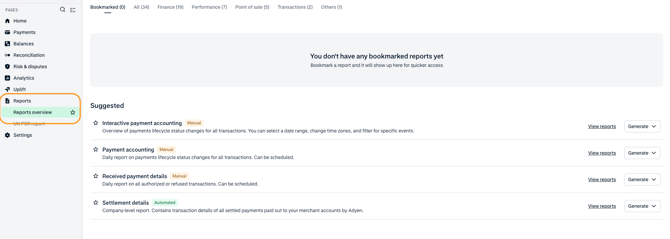
Logge dich in dein **Adyen Dashboard** ein und klicke links im Menü auf **Reports** und **Report Übersicht. **
****
#### **Schritt 2 – Settlement details finden**
Suche in der Report-Übersicht (Reiter **All** oder Abschnitt **Suggested**) den Report **„Settlement details"**.
💡 *In Adyen beschrieben als: „Transaction details for all settled payments paid out to you by Adyen. Can be scheduled daily, weekly, monthly, and at batch close."*
#### **Schritt 3 – Automatisierung starten**
Klicke rechts in der Zeile auf **„Generate"** und wähle im Dropdown **„Automated (generate on schedule)"**.

#### **Schritt 4 – Grundeinstellungen setzen**
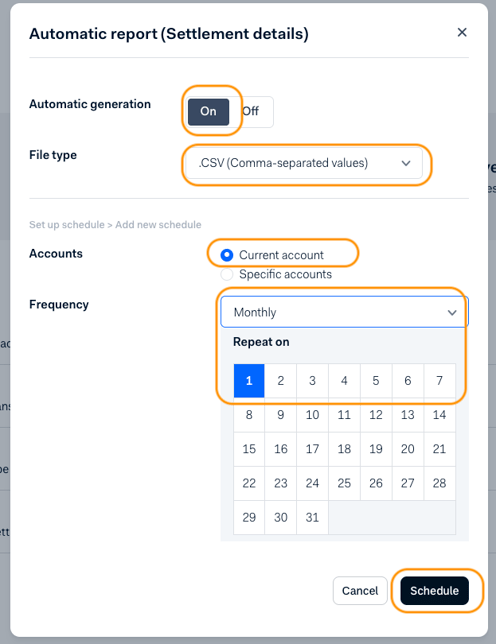
- Setze **Automatic generation** auf **On**.
- Wähle bei **File type** den Typ **.CSV (Comma-separated values)**.
- **Zeitplan hinzufügen:**
Klicke auf **„+ Add report schedule"**.
- **Accounts auswählen**
Wähle unter **Accounts** aus, für welche Konten der Report gelten soll:
- - **Current account** – für den aktuellen Account, oder
- **Specific accounts** – für ausgewählte Accounts.
- **Frequenz festlegen**
Stelle bei **Frequency** die Empfehlung ein: **Monthly** → im Feld **„Repeat on"** den Tag **1** auswählen.
💡 *So wird zu Monatsbeginn automatisch ein Report für den Vormonat erzeugt.*
- **Speichern**
Klicke auf **„Schedule"**.
#### **Schritt 5 – Zeitplan prüfen** Kontrolliere unter **Current schedule**, dass dort steht: **„Generated: Monthly on day 1"** ✅
---
### 🥳 Du hast es geschafft!
Adyen erstellt den Settlement Report ab jetzt automatisch. Sobald deine API-Verbindung steht, ruft pathway den Report selbstständig ab und erstellt daraus deinen DATEV-Buchungsstapel – ganz ohne manuellen Upload.
➡️ Weiter geht's mit: [Adyen API verbinden](https://hilfe.pathway-solutions.de/de/knowledge/zahlungsanbieter/adyen.api-verbinden?hsLang=de)
---
### ✅ FAQ – Häufig gestellte Fragen
**❓ Warum muss ich den Report automatisieren?
**
pathway kann nur Reports abrufen, die Adyen tatsächlich erzeugt. Ohne automatischen Zeitplan wird kein Report bereitgestellt – und es entsteht kein Buchungsstapel.
**❓ Welche Frequenz soll ich wählen?**
Wir empfehlen **Monthly** mit **„Repeat on" Tag 1**. So passt der Report optimal zur monatlichen Verbuchung. Adyen bietet zwar auch daily/weekly/at batch close – für eine saubere monatliche Buchhaltung ist „Monthly on day 1" die richtige Wahl.
**❓ Welches Dateiformat brauche ich?
.CSV (Comma-separated values)** – das ist das Format, das pathway verarbeitet.
**❓ Kann ich mehrere Accounts abdecken?**
Ja. Wähle bei **Accounts** entweder „Current account" oder „Specific accounts". Du kannst auch mehrere Zeitpläne anlegen.
**❓ Woran erkenne ich, dass der Report noch manuell ist?**
In der Report-Übersicht ist der Report als **„Manual"** gekennzeichnet bzw. es ist kein Zeitplan unter „Current schedule" hinterlegt. Nach der Einrichtung erscheint dort „Generated: Monthly on day 1".
---
### Support und Kontaktmöglichkeiten
💌 Du brauchst Unterstützung? Unser Support Team ist jederzeit für dich da:
💬 [zu unserem Chat](https://app.pathway-solutions.de/)
- [Onboarding (Unternehmen)](https://hilfe.pathway-solutions.de/de/knowledge/onboarding-unternehmen?hsLang=de)
- [Onboarding (Steuerberatung)](https://hilfe.pathway-solutions.de/de/knowledge/onboarding-steuerberatung?hsLang=de)
- [Steuerberatung](https://hilfe.pathway-solutions.de/de/knowledge/steuerberatung?hsLang=de)
- [Shopify](https://hilfe.pathway-solutions.de/de/knowledge/shopify?hsLang=de#main-content)
- [Erste Schritte & Einrichtung](https://hilfe.pathway-solutions.de/de/knowledge/shopify?hsLang=de#erste-schritte-einrichtung)
- [Kontierung & Buchungslogik](https://hilfe.pathway-solutions.de/de/knowledge/shopify?hsLang=de#kontierung-buchungslogik)
- [Shopify POS (Point of Sale)](https://hilfe.pathway-solutions.de/de/knowledge/shopify?hsLang=de#shopify-pos-point-of-sale)
- [Steuern, Währung & Ausland](https://hilfe.pathway-solutions.de/de/knowledge/shopify?hsLang=de#steuern-w%C3%A4hrung-ausland)
- [Gutscheine, Rabatte & Zusatzfeatures](https://hilfe.pathway-solutions.de/de/knowledge/shopify?hsLang=de#gutscheine-rabatte-zusatzfeatures)
- [Buchungsstapel & Schnittstellen](https://hilfe.pathway-solutions.de/de/knowledge/shopify?hsLang=de#buchungsstapel-schnittstellen)
- [Troubleshooting & Datenprüfung](https://hilfe.pathway-solutions.de/de/knowledge/shopify?hsLang=de#troubleshooting-datenpr%C3%BCfung)
- [Shopify Setup mit pathway](https://hilfe.pathway-solutions.de/de/knowledge/shopify?hsLang=de#shopify-setup-mit-pathway)
- [Anleitungen](https://hilfe.pathway-solutions.de/de/knowledge/shopify?hsLang=de#anleitungen)
- [pathway Rechnungsprinter](https://hilfe.pathway-solutions.de/de/knowledge/pathway-rechnungsprinter?hsLang=de#main-content)
- [Get to know pathway Rechnungsprinter](https://hilfe.pathway-solutions.de/de/knowledge/pathway-rechnungsprinter?hsLang=de#get-to-know-pathway-rechnungsprinter)
- [Setup der Rechnung](https://hilfe.pathway-solutions.de/de/knowledge/pathway-rechnungsprinter?hsLang=de#setup-der-rechnung)
- [Setup Rechnungsversand](https://hilfe.pathway-solutions.de/de/knowledge/pathway-rechnungsprinter?hsLang=de#setup-rechnungsversand)
- [Individualisierung](https://hilfe.pathway-solutions.de/de/knowledge/pathway-rechnungsprinter?hsLang=de#individualisierung)
- [Rechnungen herunterladen](https://hilfe.pathway-solutions.de/de/knowledge/pathway-rechnungsprinter?hsLang=de#rechnungen-herunterladen)
- [E-Rechnung](https://hilfe.pathway-solutions.de/de/knowledge/pathway-rechnungsprinter?hsLang=de#e-rechnung)
- [Support](https://hilfe.pathway-solutions.de/de/knowledge/pathway-rechnungsprinter?hsLang=de#support)
- [WooCommerce](https://hilfe.pathway-solutions.de/de/knowledge/woocommerce?hsLang=de#main-content)
- [WooCommerce Setup mit pathway](https://hilfe.pathway-solutions.de/de/knowledge/woocommerce?hsLang=de#woocommerce-setup-mit-pathway)
- [Anleitungen](https://hilfe.pathway-solutions.de/de/knowledge/woocommerce?hsLang=de#anleitungen)
- [Stripe Billing](https://hilfe.pathway-solutions.de/de/knowledge/stripe-billing?hsLang=de#main-content)
- [Anleitungen](https://hilfe.pathway-solutions.de/de/knowledge/stripe-billing?hsLang=de#anleitungen)
- [Chargebee](https://hilfe.pathway-solutions.de/de/knowledge/chargebee?hsLang=de#main-content)
- [Anleitungen](https://hilfe.pathway-solutions.de/de/knowledge/chargebee?hsLang=de#anleitungen)
- [Amazon Seller Central](https://hilfe.pathway-solutions.de/de/knowledge/amazon-seller-central?hsLang=de#main-content)
- [Amazon Shop / Order](https://hilfe.pathway-solutions.de/de/knowledge/amazon-seller-central?hsLang=de#amazon-shop-order)
- [Amazon Payout](https://hilfe.pathway-solutions.de/de/knowledge/amazon-seller-central?hsLang=de#amazon-payout)
- [Marktplätze](https://hilfe.pathway-solutions.de/de/knowledge/marktpl%C3%A4tze?hsLang=de#main-content)
- [AboutYou](https://hilfe.pathway-solutions.de/de/knowledge/marktpl%C3%A4tze?hsLang=de#aboutyou)
- [Ebay](https://hilfe.pathway-solutions.de/de/knowledge/marktpl%C3%A4tze?hsLang=de#ebay)
- [Kaufland](https://hilfe.pathway-solutions.de/de/knowledge/marktpl%C3%A4tze?hsLang=de#kaufland)
- [Otto](https://hilfe.pathway-solutions.de/de/knowledge/marktpl%C3%A4tze?hsLang=de#otto)
- [TikTok Shop](https://hilfe.pathway-solutions.de/de/knowledge/marktpl%C3%A4tze?hsLang=de#tiktok-shop)
- [Zahlungsanbieter](https://hilfe.pathway-solutions.de/de/knowledge/zahlungsanbieter?hsLang=de#main-content)
- [Allgemein](https://hilfe.pathway-solutions.de/de/knowledge/zahlungsanbieter?hsLang=de#allgemein)
- [Shopify Payments](https://hilfe.pathway-solutions.de/de/knowledge/zahlungsanbieter?hsLang=de#shopify-payments)
- [PayPal](https://hilfe.pathway-solutions.de/de/knowledge/zahlungsanbieter?hsLang=de#paypal)
- [Klarna](https://hilfe.pathway-solutions.de/de/knowledge/zahlungsanbieter?hsLang=de#klarna)
- [Stripe Payments](https://hilfe.pathway-solutions.de/de/knowledge/zahlungsanbieter?hsLang=de#stripe-payments)
- [Mollie](https://hilfe.pathway-solutions.de/de/knowledge/zahlungsanbieter?hsLang=de#mollie)
- [GoCardless](https://hilfe.pathway-solutions.de/de/knowledge/zahlungsanbieter?hsLang=de#gocardless)
- [Adyen](https://hilfe.pathway-solutions.de/de/knowledge/zahlungsanbieter?hsLang=de#adyen)
- [Shopify POS](https://hilfe.pathway-solutions.de/de/knowledge/zahlungsanbieter?hsLang=de#shopify-pos)
- [UNZER](https://hilfe.pathway-solutions.de/de/knowledge/zahlungsanbieter?hsLang=de#unzer)
- [DATEV](https://hilfe.pathway-solutions.de/de/knowledge/datev?hsLang=de#main-content)
- [DATEV Buchungsdatenservice](https://hilfe.pathway-solutions.de/de/knowledge/datev?hsLang=de#datev-buchungsdatenservice)
- [DATEV Schnittstelle](https://hilfe.pathway-solutions.de/de/knowledge/datev?hsLang=de#datev-schnittstelle)
- [Allgemeine Anleitungen](https://hilfe.pathway-solutions.de/de/knowledge/datev?hsLang=de#allgemeine-anleitungen)
- [Über pathway solutions](https://hilfe.pathway-solutions.de/de/knowledge/%C3%BCber-pathway-solutions?hsLang=de#main-content)
- [Allgemeines](https://hilfe.pathway-solutions.de/de/knowledge/%C3%BCber-pathway-solutions?hsLang=de#allgemeines)
- [Abos, Preise & Rechnungen](https://hilfe.pathway-solutions.de/de/knowledge/%C3%BCber-pathway-solutions?hsLang=de#abos-preise-rechnungen)
- [Nutzer & Kontenverwaltung](https://hilfe.pathway-solutions.de/de/knowledge/%C3%BCber-pathway-solutions?hsLang=de#nutzer-kontenverwaltung)
- [Plattform & Integrationen](https://hilfe.pathway-solutions.de/de/knowledge/%C3%BCber-pathway-solutions?hsLang=de#plattform-integrationen)
- [Features & Zusatzoptionen](https://hilfe.pathway-solutions.de/de/knowledge/%C3%BCber-pathway-solutions?hsLang=de#features-zusatzoptionen)
- [Xentral](https://hilfe.pathway-solutions.de/de/knowledge/xentral?hsLang=de)
[](https://www.pathway-solutions.de)
pathway solutions gmbh
[mailto:support@pathway-solutions.de](mailto:support@pathway-solutions.de)
Copyright © 2025, pathway solutions gmbh